

On this page
Unfamiliar word? Select a dotted-underlined term for its meaning.
What is a receiving station?
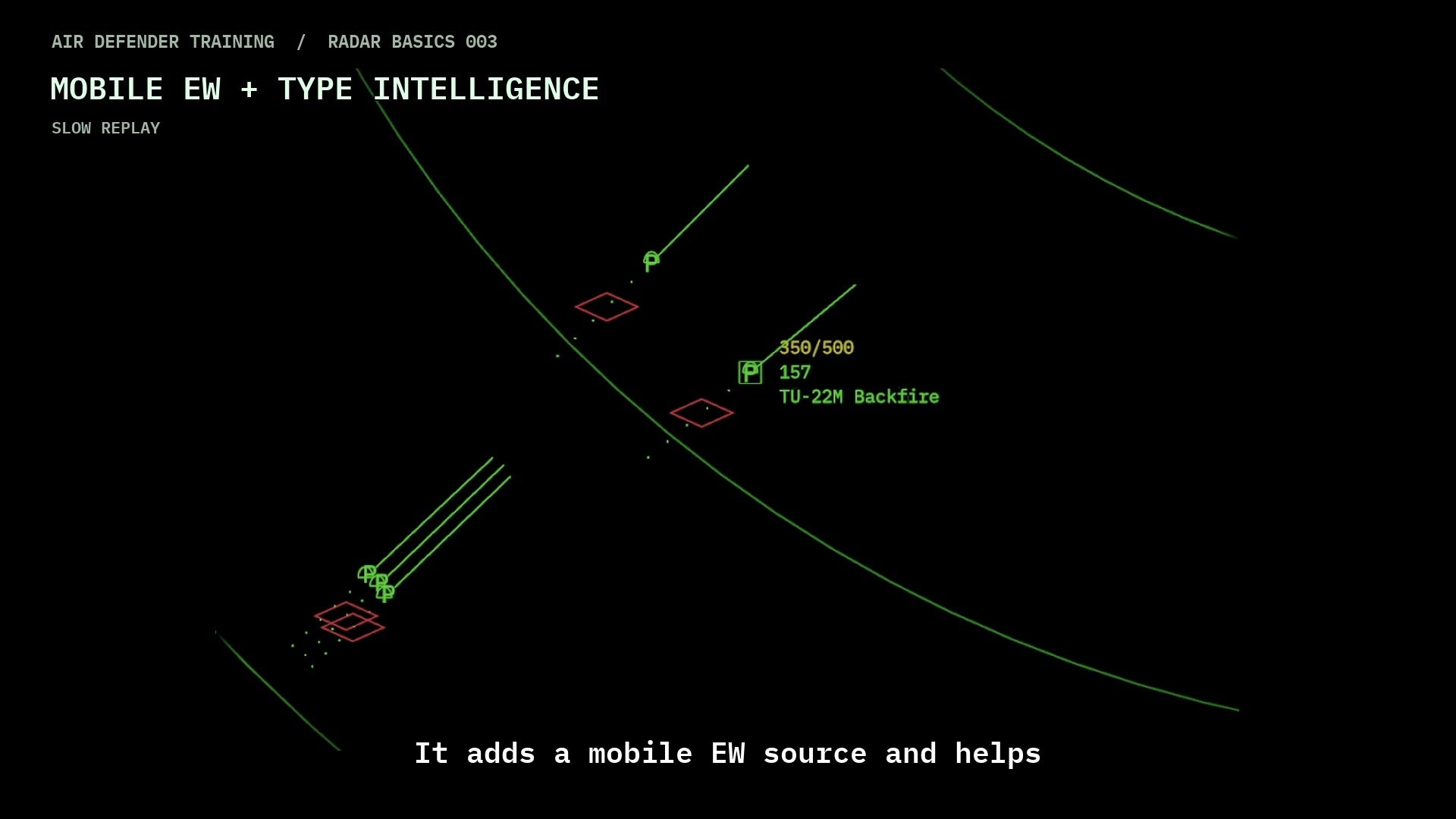
It is equipment listening for an electronic signal. Here, receiver means a listening sensor, not an aircraft taking fuel from a tanker. Comparing the directions measured by different stations helps the game estimate where the signal came from.
The game’s key
Read it as sensor evidence
These are Air Defender display conventions. They communicate the number of contributing receivers, not a universal real-world standard for all radar consoles. A position estimate and a hostile identification are different conclusions.
Does a full diamond mean Hostile?
No. A full diamond tells you that more listening sensors contributed to the EW picture. Hostile is a separate track identity, shown by H. Read the track identity and check the other information before deciding what to do. Two reports from the same sensor do not count as two different sensors.
Use the symbol with the rest of the picture
- Find the listening source and read the bearing direction using the strobe guide. A line alone does not provide a measured distance.
- Compare the diamond shape with the key above. It describes contributing listening sensors, not the number of aircraft in a group.
- Select a radar contact and check its track number, identity letter, callsign and available data. Use TRACK LIST if contacts overlap. Do not assume the nearest contact owns the diamond. A missing diamond alone does not prove that a radar track has faded.
- Look for new reports during a listening period. History plots show previous EW information; they are not an aircraft’s planned route.
- If the information is unclear, check the EW switch and Nimrod exception, then the display and sensor checks. Do not count diamonds as a complete count of aircraft or use a diamond alone as permission to attack.
A diamond is a reported position, not continuous tracking
The game collects listening reports during short listening periods. The shape key above uses different listening sensors reporting the same contact in that period. It does not add one sensor’s reports from three different periods and call that three sensors.
Bearing lines can disappear when a listening period ends, while a diamond remains at its last reported position. The diamond updates when new EW reports update it; it does not continuously follow the aircraft between reports. A moving radar track beside a stationary EW diamond therefore does not, by itself, mean the aircraft stopped or the display failed. Compare the radar track data and wait for fresh EW information.
White EW plots and white aircraft tracks are different
The white dots behind an EW diamond are its earlier EW position reports: history dots, or plots. The full diamond is the three-or-more-sensor case that can add an EW history plot. Older plots are eventually replaced as new ones are added, so their number is not a count of every report since the session began. A later squashed diamond can still have plots left from an earlier full-diamond report. Those old plots do not prove that three sensors are reporting now.
These EW plots are drawn white; their brightness is not a reliable age scale. A white aircraft track supplied by AWACS is a separate display convention. Read the symbol and its context, rather than treating every white mark as the same kind of information. For a radar track that flashes and disappears, use the faded-track guide.
When the EW picture looks incomplete
| What you see | What it means and what to check |
|---|---|
| A bearing line but no diamond | One listening sensor gives a direction clue. The position-symbol key needs reports from additional different sensors; one line’s endpoint is not a measured aircraft position. |
| Lines disappear but a diamond stays still | You may be between listening periods, looking at the last EW report. Compare the radar contact and watch for the next EW update. Do not use the old diamond as a continuously current aircraft position. |
| Fewer diamonds than radar contacts | The EW display can combine contacts of the same type and is not an aircraft-count display. Use TRACK LIST and individual track data; not every aircraft produces an EW symbol. |
| EW is off but some EW information remains | Check for an active Nimrod R1. Its listening is an exception to the global EW switch; switching ground EW off is not proof that every EW source has stopped. |
| White plots disappear or stop growing | A visible history is limited and can be cleared when all EW listening is off or when the game can no longer show the associated contact as an EW symbol. This alone does not establish why an aircraft vanished. Follow the track and sensor checks. |
For a problem report, record the game version, EW switch response in ASMA, listening source, observed symbol and whether a fresh listening period changed it. Include the same area before and after. A screenshot of an old diamond alone cannot show that new reports are arriving.
Observe one update without changing aircraft orders
- Use an ordinary session where EW information is already visible. Read the EW switch restrictions first; this exercise does not override training or Hard difficulty.
- Keep one part of the map in view. Note a bearing line, any diamond and the nearby radar contact. Read the contact’s identity separately from the diamond shape.
- Watch what remains after the bearing line disappears. If a diamond stays, treat it as a reported position, not proof that the aircraft has stopped.
- During a later listening period, compare the diamond and history plots again. If no fresh report arrives, record that observation; do not invent a speed or position from the old symbol.
- Leave aircraft tasks unchanged. If you changed any permitted EW or display setting, restore the starting state and check the actual ASMA response where applicable.
If you suspect jamming
Hiding clutter is not a command to stop a jammer. Read the named radar and bearing in ASMA, then compare fresh sensor reports. The jamming guide gives the warning format, display checks and recovery steps.
Which contact does a diamond represent?
An EW diamond has no track number or callsign. A radar contact can move while the diamond remains at an earlier reported position. Contacts of the same type can share one diamond. Selecting a radar contact shows that track’s data; closeness alone does not confirm a match. If the match is unclear, keep it unconfirmed and look for fresh reports in a later listening period.
What does the EW sound mean?
A short sound can draw your attention when a new squashed or full EW diamond appears. Look at the symbol and compare the other information; the sound does not identify the aircraft as hostile.
Do not count aircraft by counting sounds. Several new diamonds in the same listening period can share one cue, and an existing diamond does not sound again on every update.